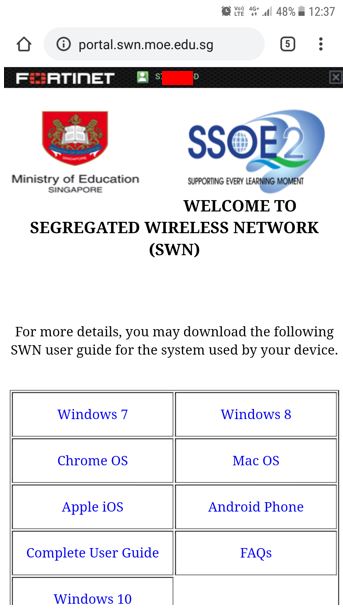
SWN@SSOE Login Guide
Connect to the SWN@SSOE school WIFI using your MIMS login details to access the internet for teaching and learning.
School users may connect to SWN@SSOE WIFI to access the internet for teaching and learning purposes.
To connect to SWN@SSOE WIFI:
1. On your device, under “Settings”, select "Connections", enable your "WIFI".
2. Select “SWN@SSOE”.
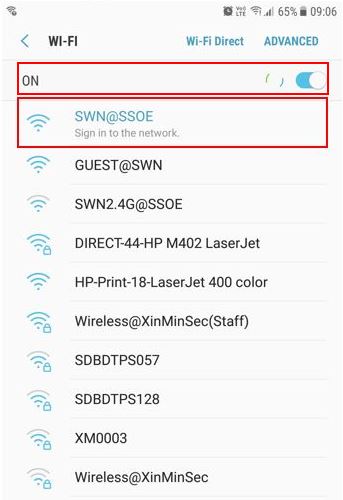
3. Upon connected to “SWN@SSOE” WIFI, you will be redirected to SWN@SSOE login page.
- If you are not directed to the login page, go to “http://portal.swn.moe.edu.sg”
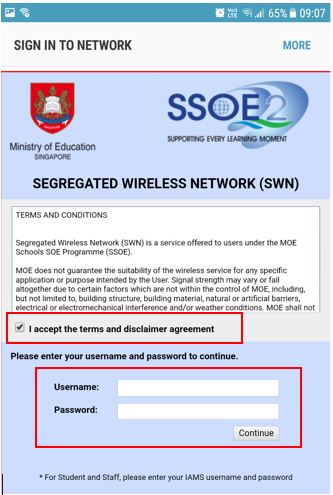
- Check the “I accept the terms and disclaimer agreement”.
- Login with your MIMS credentials,
MIMS credentials format should look like this:
If your full name is tan xue ling:
Username: tan_xue_ling@students.edu.sg
Password: your MIMS passsword
If you have forgotten your MIMS password, please fill up the online form here (opens in new tab).
4. You should see this page upon successfully login to "SWN@SSOE" WIFI.